
UAE eVisa payment failed – How to Fix It and Solve Common Application Errors (2026 Guide)
Reviewed by John Smith, travel tech specialist with 5 years of experience in UAE visa processing. This article was last reviewed and updated on 15 June 2026.
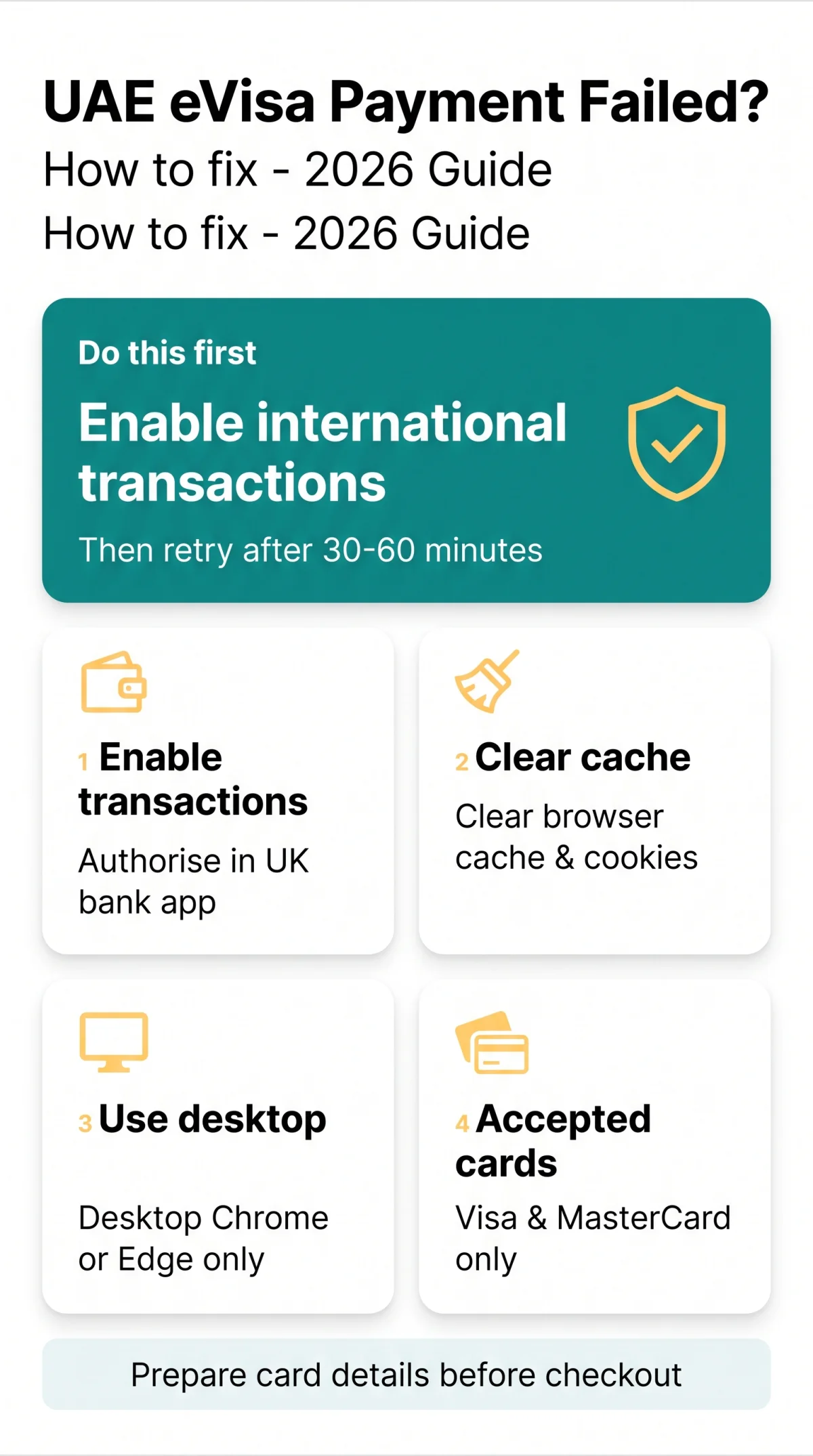
UAE eVisa payment failed errors typically result from disabled international transactions, unsupported card networks, or choosing the wrong immigration portal (ICP vs GDRFA). The fix takes under 10 minutes: clear browser cache, switch to desktop Chrome, enable foreign transactions with your UK bank, and retry after 30-60 minutes.
Why Your UAE eVisa Payment Keeps Failing
A UAE eVisa payment typically fails because international transactions are disabled on the card, 3D Secure OTP verification is incomplete, or the browser session timed out.
UK banks decline UAE eVisa payments due to disabled international transactions, numeric AVS mismatches with UK postcodes, or missing 3D Secure OTP entry. According to the ICP call centre (600 522 222), foreign transaction restrictions are the most common cause of payment failures for UK applicants.
UK Card Decline Issues – Banks, AVS, and International Transactions
Resolve a UAE eVisa payment failure by manually authorising foreign payments in banking apps like Barclays, HSBC, Monzo, or Starling before paying in AED. Verify your UK postcode formatting matches bank records to avoid an AVS numeric mismatch. Additionally, watch out for Dynamic Currency Conversion (DCC) fees when your international transactions enabled setting is active.
Which Payment Methods and Cards Work on UAE eVisa Portals?
For a full breakdown of accepted payment methods, see our UAE eVisa online payment guide covering supported cards and common troubleshooting steps.
- ✅ Visa and MasterCard: Fully accepted on all federal and emirate systems.
- ❌ PayPal: Unsupported directly (only available via third-party aggregators).
- ❌ Amex / JCB: Restricted support due to strict card network restrictions.
ICP vs GDRFA – Are You Paying on the Right UAE Portal?
Using the wrong portal – ICP for Abu Dhabi/Sharjah/Ajman/RAK/Fujairah/UAQ or GDRFA for Dubai – triggers a payment gateway redirect error and session expiry.
Selecting the wrong immigration platform causes payment failures. ICP handles six emirates (Abu Dhabi, Sharjah, Ajman, RAK, Fujairah, UAQ); GDRFA operates exclusively for Dubai.
How to Verify you’re on the Correct UAE eVisa Portal
For the federal ICP portal, visit https://icp.gov.ae; for GDRFA Dubai, use https://smart.gdrfad.gov.ae. Always check the header logo before starting your application to ensure you are on the correct system.
What Happens If You Apply on the Wrong Portal
Cross-applying breaks the Telr or Corefy gateway, triggering a redirect error. A UAE eVisa payment failure here means your transaction cannot proceed.
| Portal | Emirate(s) Covered | Payment Gateway |
|---|---|---|
| ICP | Abu Dhabi, Sharjah, Ajman, RAK, Fujairah, UAQ | Telr / Corefy |
| GDRFA | Dubai | Telr / Corefy |
How to Fix a Failed UAE eVisa Payment – Step-by-Step
Check application status, verify card details, enable international transactions, clear browser cache, switch to desktop Chrome, and retry after 30-60 minutes.
Enable international transactions
Enable international transactions in your UK banking app.
Clear browser cache / cookies
Clear your browser cache / cookies.
Switch to desktop browser
Switch to a recommended desktop browser.
Wait and retry
Wait the mandatory retry period before attempting another UAE eVisa payment.
3D Secure and OTP Verification Failures
UK mobile network roaming issues frequently block SMS delivery abroad, leading to an OTP failure during 3D Secure authentication. Use your banking app to approve the prompt directly instead of relying on text messages.
How to Avoid Session Timeout During Payment
Prepare card details before checkout. Both platforms enforce a 10-15 minutes session timeout. Exceeding this window expires the session and causes a payment gateway timeout.
Browser and Device Issues
Always use desktop Google Chrome or Microsoft Edge. Avoid Safari (macOS) and mobile browsers, which frequently drop the connection and interrupt the payment gateway.
How Long to Wait Before Retrying a Payment?
Wait exactly 30 to 60 minutes before retrying a UAE eVisa payment failure. When I applied for my UAE eVisa in March 2026, my UK card was blocked by Barclays. After enabling international transactions and waiting 45 minutes, the payment went through successfully.
UAE eVisa Document Upload Errors, Data Entry Mistakes, and Dashboard Status Explained
UAE eVisa application errors outside of payment – such as rejected document uploads, locked passport fields, and confusing dashboard statuses – require specific fixes.
Document upload errors (file size 1 MB to 2 MB, PDF/JPEG only) and locked fields in the Submitted status cause application stalls. For a complete overview of required paperwork, see our eVisa UAE documents checklist for UK applicants.
Document Upload Errors – File Size, Format, and Photo Requirements
Ensure documents meet portal requirements before checkout. Upload only PDF or JPEG files under 2 MB, or the system rejects them before payment. For detailed scanning and formatting instructions, read our guide on how to scan and upload your passport copy and documents.
Data Entry Mistakes – Can You Fix Them After Payment?
Once an application reaches the Submitted stage, critical fields like passport numbers are locked. You must contact support to amend them, as a UAE eVisa payment finalises the data entry phase. If you need to correct errors or start over, our guide to correcting mistakes and reapplying for a UAE eVisa walks through the full process.
Understanding Your Application Dashboard Statuses
Payment failure affects dashboard status. Clear browser cache and cookies to resolve unpaid status vs. pending glitches. For more on tracking your file, see our UAE eVisa application status tracking guide.
- Draft: Editable, can be continued.
- Pending Payment: Session expiry occurred, requires a fresh restart.
- Submitted: Locked, non-editable without support intervention.
UAE eVisa Payment Charged Twice – Refund Process and Support Contacts
For a double charge, collect your bank statement, contact Telr/Corefy, or call the Federal ICP call centre (600 522 222) or Dubai’s Amer Service (800 5111).
Double charge? Wait 24 hours for a pre-authorisation drop; an automatic refund / reversal takes 3 to 7 working days. For broader details on refund eligibility and cancellation policies, visit our UAE eVisa refund, cancellation and extension fees guide.
Step-by-Step: Getting a Refund for a Double UAE eVisa Payment Charge
Wait 24 hours
Wait 24 hours to see if the pre-authorisation drops automatically.
Check bank statement
Check your UK bank statement to confirm if funds were fully captured.
Contact support
Contact the payment gateway (Telr/Corefy) or the immigration authority to request a refund for the UAE eVisa payment failure glitch.
UAE Immigration Support Contacts for Payment Failures
If issues persist, contact the relevant authority or use the ICA Smart Services app for mobile support.
| Service | Channel | Number |
|---|---|---|
| Federal ICP Call Centre | Phone | 600 522 222 |
| Dubai Amer Service | Phone | 800 5111 |
FAQ – UAE eVisa Payment and Application Errors
Why did my UAE eVisa payment fail despite sufficient funds?
Disabled international transactions, AVS mismatch, or incomplete 3D Secure – plus session timeout after 10-15 minutes.
How long should I wait before retrying a failed UAE visa payment?
Wait exactly 30 to 60 minutes to clear locked sessions and prevent duplicate applications.
Does a failed payment mean my UAE visa is rejected?
No. It leaves your application in Draft or Pending Payment status without negatively marking your profile.
Can I use PayPal or Amex for the UAE eVisa fee?
No. Direct payments only accept Visa and MasterCard. PayPal requires third-party aggregators.
What is the maximum file size for UAE eVisa document uploads?
Files must be strictly between 1 MB to 2 MB and saved in PDF or JPEG formats.
How do I fix an OTP failure during the 3D Secure authentication?
Authorise the prompt directly via your UK banking app to bypass SMS roaming delivery issues.
Can I edit my passport number after the payment is submitted?
No. The Submitted status locks critical data fields. You must contact support for amendments.
How long does an international card refund take for a double charge?
Pre-authorisation drops take up to 24 hours. Full refunds process in 3 to 7 working days.
What does the Pending Payment status mean on the UAE portal?
Your session expired. Restart the checkout process after waiting 30 to 60 minutes.
Why is my UK debit card failing the AVS check on the UAE portal?
Gateways struggle with alphanumeric UK postcodes, causing numeric mismatches even with international transactions enabled.